

The first useful AI workflow in a small business usually starts with a moment of irritation: the lead that sat unanswered all afternoon, the invoice reminder nobody wanted to write, the tenth version of the same customer question, the blank email campaign that should have gone out yesterday.
That is the right place to start. Not with an AI strategy deck. Not with a tool hunt. Start with a recurring piece of work that drains attention and still needs a human to make the final call.
A prompt is a one-off request. A workflow is a repeatable path from input to finished work. “Write a social post” is a prompt. “Turn this week’s customer questions, reviews, and completed jobs into three approved posts, one email, and two FAQ updates every Friday” is a workflow.
That difference matters for small business owners because time is usually the tightest constraint. AI adoption is already moving from curiosity to daily use. The U.S. Chamber of Commerce reported in its 2025 small business technology research that 58% of small businesses said they used generative AI, up from 40% in 2024 and 23% in 2023, according to the U.S. Chamber. Those numbers do not mean every owner has a mature AI process. In many shops, AI is still a tab people open when they are stuck.
The better goal is smaller and more useful: build a few repeatable workflows that reduce manual work without weakening customer trust.
What makes an AI workflow useful in a small business
A good generative AI workflow has five parts:
- A trigger, such as a new form submission, customer email, review, meeting transcript, product upload, or unpaid invoice.
- Business context, such as your services, policies, tone, pricing rules, product facts, FAQs, or past approved examples.
- An AI task, such as summarizing, drafting, classifying, rewriting, extracting, comparing, or suggesting next steps.
- A human checkpoint, especially before anything goes to a customer or affects money, legal terms, refunds, employees, health, safety, or privacy.
- A destination, such as an email draft, CRM note, support ticket, task, scheduled post, product page, spreadsheet, or knowledge base update.
The human checkpoint is where many small businesses should be stricter, not looser. AI is excellent at producing a first draft, but it can also invent details, smooth over exceptions, or sound oddly confident about things it does not know. Shopify’s own guidance for AI-generated product descriptions tells merchants to review generated text and make sure product information is accurate before publishing, a useful rule for almost every workflow in this article. See Shopify’s product guidance.
A practical rule: AI can prepare the work. A person owns the promise.
Pick the first workflow by pain, not novelty
The best first workflow is rarely the most impressive one. It is the one that happens often, follows a pattern, and wastes time even though the decision is not especially complex.
| Workflow test | Good first candidate | Poor first candidate |
|---|---|---|
| Frequency | Happens daily or weekly | Happens once a quarter |
| Input quality | Uses messages, forms, invoices, transcripts, reviews, or product data | Depends on undocumented judgment |
| Risk | Mistakes can be caught before customers see them | Mistakes could cause legal, financial, safety, or reputational harm |
| Measurement | Saves time, speeds replies, reduces missed follow-up, or improves consistency | Feels modern but has no obvious metric |
| Ownership | One person can review and improve it | Everyone touches it and nobody owns it |
Start with work that is repetitive but still benefits from your taste and judgment. Lead follow-up, customer support drafting, review responses, content repurposing, product descriptions, invoice reminders, and call summaries all fit that pattern.
Avoid starting with work that has high downside. Do not let AI independently approve refunds, change payroll, diagnose regulated issues, rewrite contracts, deny service, make medical or financial claims, or promise delivery dates it cannot verify. The NIST AI RMF frames AI risk management around understanding and managing risk to people, organizations, and society. A small business does not need a committee to apply that idea. It needs a short list of tasks where AI is allowed, tasks where AI drafts only, and tasks where AI is not used.
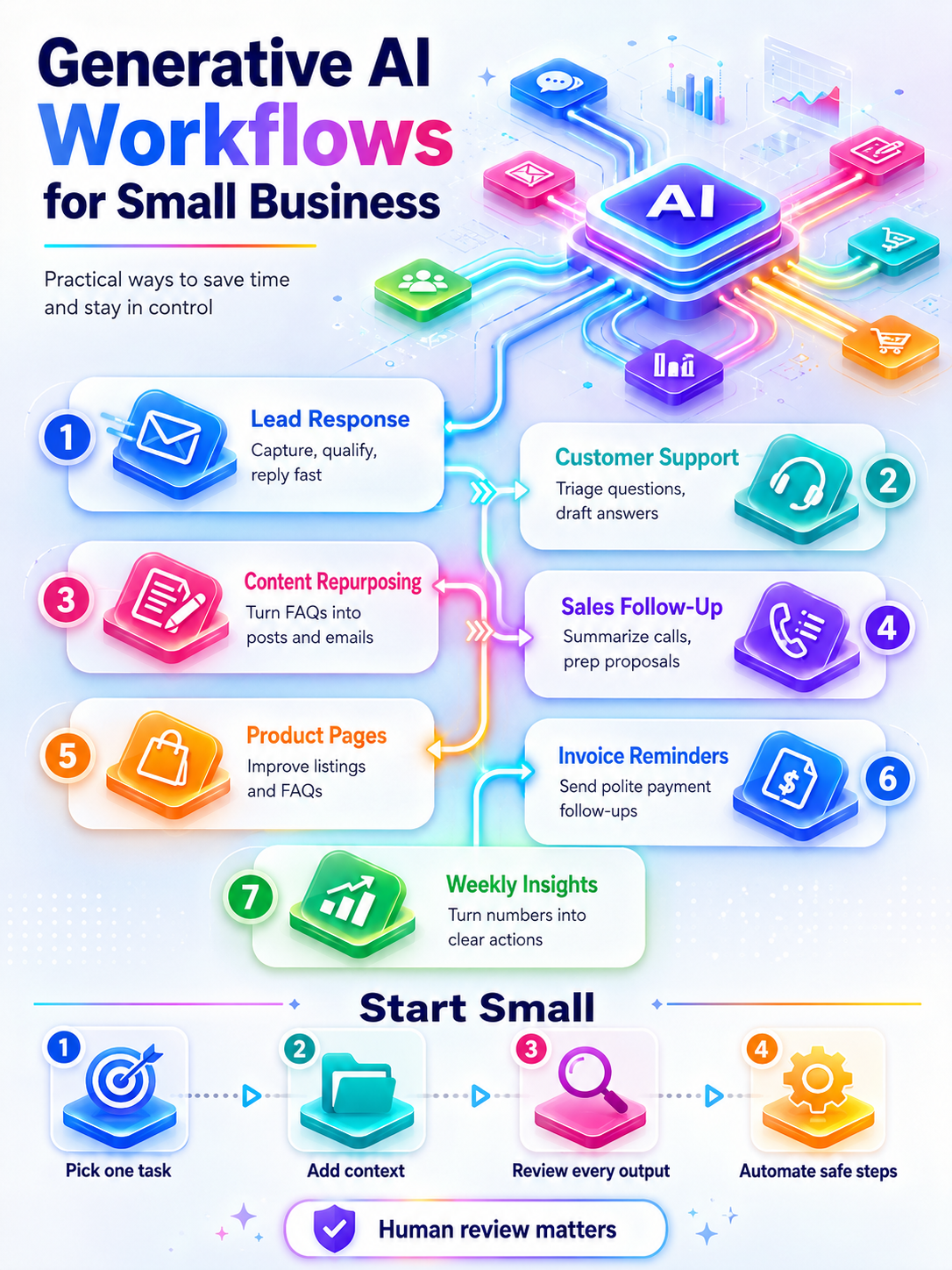
Workflow 1: Lead intake and first-response drafting
Small businesses lose leads in the gap between interest and reply. Someone fills out a contact form at 10:42 a.m. The owner is on a job, in a client meeting, or covering the front desk. By 5 p.m., the prospect has contacted three competitors.
AI cannot fix a weak sales process by itself, but it can make the first response faster and less generic.
A lead workflow can look like this:
- A form, voicemail transcript, chat, email, or direct message arrives.
- The lead is added to a CRM, spreadsheet, or inbox label.
- AI extracts the service requested, location, urgency, timeline, budget clues, and missing details.
- AI drafts a reply from an approved template.
- A person reviews the draft and sends it, or the system sends a low-risk acknowledgment email.
- A follow-up task is created if there is no response.
For a local landscaping company, a message might say: “We just bought a house in Mesa and need the backyard cleaned up before a graduation party next month. Can someone come look?”
The internal AI summary should be plain:
- Service requested: backyard cleanup, possible landscaping
- Location: Mesa
- Timeline: before graduation party next month
- Urgency: moderate
- Missing details: yard size, photos, preferred walkthrough times
- Suggested next step: ask for photos or schedule estimate
The customer reply does not need to sound clever. It needs to be fast, specific, and accurate:
“Thanks for reaching out, and congratulations on the new house. We can help with pre-event yard cleanup. Could you send two or three photos of the backyard and your preferred week for an estimate? We can also schedule a walkthrough if that is easier.”
Keep pricing, guarantees, and scheduling commitments out of the AI’s hands unless the data is structured and current. The first version of this workflow should draft, not send. Once the replies are consistently accurate, you can automate only the acknowledgment step.
Track response time, percentage of leads contacted within one business day, appointments booked, and closed deals by lead source.
Workflow 2: Customer support triage and reply drafts
Support messages often mix simple requests with emotionally loaded ones. “Where is my order?” and “Your technician missed the appointment and nobody called” should not be treated the same way.
AI works well as a sorter and first drafter. It should not be the only voice in a frustrated customer’s inbox. HubSpot’s customer service guidance recommends using AI for routine requests and reply drafts while keeping human review for tone and empathy. See HubSpot’s service advice.
A support workflow can run like this:
- A support message arrives by email, chat, website form, or social DM.
- AI classifies it by category: billing, scheduling, order status, refund, warranty, complaint, product question, technical issue, urgent.
- AI checks approved source material: FAQ, warranty terms, refund policy, service areas, business hours, escalation rules.
- AI drafts a reply or recommends an internal action.
- A staff member approves, edits, assigns, or escalates.
A good escalation rule is more important than a clever prompt. Escalate any message involving anger, injury, discrimination, property damage, legal threats, refund disputes above a set amount, or a customer who has already contacted the business twice.
Before using AI for support, create a one-page support guide. Include your refund rules, warranty language, tone examples, escalation triggers, and phrases to avoid. If your policy says refunds must be approved by a manager, the AI should never write “we can refund you today.”
The first metric is not ticket deflection. It is quality. Measure time to first response, time to resolution, number of tickets waiting more than one business day, and the percentage of AI drafts that staff send with only light edits.
Workflow 3: Weekly content repurposing from real customer questions
Most small businesses do not have a content shortage. They have a capture problem. The useful ideas show up during sales calls, service appointments, support emails, reviews, and casual customer conversations, then vanish before anyone turns them into marketing.
A weekly AI content workflow fixes that by using the business’s actual week as source material.
Collect these inputs every Friday:
- Five customer questions from calls, email, chat, or the front desk.
- Two objections prospects raised before buying.
- One review or testimonial.
- One product, service, or schedule update.
- One photo, project note, or customer story that can be shared without violating privacy.
Then ask AI to group the inputs by theme and draft several pieces:
- One email newsletter.
- Three social captions.
- One short video script.
- One FAQ page update.
- One blog outline if the topic deserves more depth.
A fitness studio might capture the same beginner questions every week: “Do I need experience?” “What should I bring?” “Can I modify exercises?” “Will I be embarrassed if I cannot keep up?”
AI can turn those into a first-timer welcome email, a “what to expect” page, five social posts, and a front-desk script. That content will beat generic AI post ideas because it starts with real customer language.
This workflow also helps with channel discipline. Constant Contact’s 2025 Small Business Now report found that 44% of small businesses globally said email was their most effective marketing channel, and 42% had less than one hour per day to spend on marketing, according to Constant Contact. For an owner with limited time, turning one week of customer questions into one useful email is often a better bet than chasing every social trend.
Track publishing consistency, email clicks, replies, consultation requests, and which customer questions keep returning. Repeated questions often point to better website copy, onboarding, pricing explanations, or sales materials.
Workflow 4: Review responses and reputation feedback
Responding to reviews is easy until the review is unfair, vague, or angry. That is exactly when the owner should not write the first draft while irritated.
An AI review workflow can keep responses calm and consistent:
- A new review appears on Google, Yelp, Facebook, a marketplace, or an industry site.
- AI labels the review as positive, neutral, negative, urgent, suspected spam, or sensitive.
- AI drafts a response using your rules.
- Negative or sensitive reviews go to the owner before posting.
- Themes are logged for operations improvements.
The response rules should be simple:
- Thank the reviewer.
- Mention one specific detail when appropriate.
- Do not argue.
- Do not reveal private customer information.
- Do not offer compensation publicly unless that is your policy.
- Invite unhappy customers into a private resolution path.
- Keep most responses under 90 words.
For a positive review, the draft might be: “Thank you, Maria. We are glad the installation went smoothly and that the crew left the space clean. We appreciate you choosing us for the project.”
For a negative review: “Thank you for sharing this. We are sorry the scheduling experience did not meet expectations. We would like to review what happened and see where we can make this right. Please contact our office and ask for Daniel.”
The hidden payoff is not the response itself. It is the pattern log. If six reviews mention unclear appointment windows, the fix is not a better apology. The fix is a better scheduling process.
Track review response time, percentage of reviews answered, recurring complaint themes, rating changes, and internal fixes created from customer feedback.
Workflow 5: Sales call notes to proposal follow-up
A lot of small businesses sell well in conversation and lose momentum in writing. The call goes well. The prospect explains the problem. The owner promises a proposal. Then the day gets eaten by work, and the follow-up arrives two days late with half the detail missing.
AI can turn call notes into a usable follow-up package.
The workflow is simple:
- Record a sales call, transcribe it, or dictate a two-minute voice memo right after the meeting.
- AI extracts goals, pain points, objections, decision criteria, budget signals, timeline, stakeholders, and next steps.
- AI drafts a recap email.
- AI creates a proposal outline, but leaves pricing and terms blank unless they are pulled from approved data.
- Follow-up tasks are added to the CRM or calendar.
A strong instruction for this workflow:
“Use only the information in these notes. Summarize the customer’s goals, concerns, timeline, decision criteria, and next steps. Draft a friendly recap email in our voice. Do not invent pricing, guarantees, discounts, deadlines, or technical claims. Mark missing information as ‘needs confirmation.’”
That last sentence matters. AI often tries to complete the story. In sales follow-up, missing information is not a writing problem. It is a question for the buyer.
This workflow fits consultants, agencies, contractors, IT providers, event businesses, designers, accountants, coaches, and B2B service firms. Track time from call to recap, proposal turnaround time, follow-up completion, and acceptance rate.
Workflow 6: Ecommerce product page improvement
Ecommerce AI gets messy when it turns thin product data into overconfident copy. A mug becomes “perfect for every occasion.” A skincare product starts sounding like a medical treatment. A tool gets benefits the product team never claimed.
The safer workflow starts with better inputs and a verification step.
- Export product title, specs, dimensions, materials, variants, care instructions, shipping limits, return reasons, and reviews.
- AI identifies missing information and common customer questions.
- AI drafts product descriptions, FAQs, meta descriptions, comparison copy, and alt text suggestions.
- A person checks every factual claim against product data.
- Approved copy is uploaded in batches.
A weak product description might say: “Blue handmade mug. Dishwasher safe.”
A better AI-assisted version could say: “Hand-thrown ceramic mug with a deep blue glaze and a curved handle. Each mug has small variations from the firing process, so no two look exactly alike. Holds 12 oz. Dishwasher safe.”
That draft is only acceptable if the mug truly holds 12 oz and is dishwasher safe. If the product data does not include those details, the AI should ask for them, not invent them.
Product copy workflows are especially useful for stores with older catalogs, duplicate manufacturer copy, inconsistent variant descriptions, or repeated support questions. Track product page conversion rate, return reasons, search traffic, support questions per product, and time to publish new SKUs.
Workflow 7: Invoice reminders and cash flow communication
Payment follow-up is uncomfortable enough that many owners delay it. The invoice goes out. The due date passes. The reminder feels awkward. The owner waits another week.
AI can help by drafting polite, consistent messages from accounting data. The system should not shame customers, threaten fees outside your terms, or change payment agreements.
A payment workflow can work like this:
- An invoice is created in accounting software.
- Reminder timing is based on the due date.
- AI drafts a message using customer name, invoice number, amount, due date, and payment link.
- Sensitive accounts, large balances, or disputed invoices go to owner review.
- Payment status updates the customer record.
QuickBooks promotes AI payments features that draft proactive invoice reminders and suggest payment strategies based on customer history. See Intuit’s payments agent page.
A basic sequence is enough for most small businesses:
| Timing | Message goal | AI guardrail |
| Three days before due | Friendly reminder | No urgency language |
| On due date | Clear payment link | Do not imply the payment is late |
| Seven days late | Ask whether there is an issue | Do not add fees unless approved terms allow them |
| Fourteen days late | Escalate to owner review | Do not send automatically |
Track overdue invoice count, average days to payment, percentage paid on time, and time spent chasing payments. Even modest improvement can matter because cash flow pressure is often death by small delays.
Workflow 8: Meeting notes into tasks, SOPs, and FAQs
Small businesses lose a surprising amount of knowledge in conversations. A staff meeting clarifies a policy. A customer call exposes a confusing onboarding step. A vendor conversation changes a process. Two weeks later, nobody remembers the exact decision.
A meeting-to-knowledge workflow turns conversations into business memory.
- Record or transcribe a meeting, call, or voice memo, with consent where required.
- AI creates a short summary, decisions, action items, owners, deadlines, and unresolved questions.
- AI suggests updates to SOPs, customer templates, FAQs, training documents, or onboarding emails.
- A person approves changes.
- Tasks are assigned in project management software.
For example, a client onboarding meeting might produce this output:
- Decision: New clients must submit intake forms 48 hours before kickoff.
- Task: Add intake reminder to the booking confirmation email.
- SOP update: Create a path for missing intake forms.
- FAQ update: Explain what happens after a client books.
- Needs owner review: Cancellation policy wording.
This workflow helps most once a business has employees. It reduces repeated explanations and keeps process changes from living only in the owner’s head.
Track missed tasks, repeated internal questions, employee onboarding time, and number of approved SOP updates per month.
Workflow 9: Weekly dashboard summaries
Small business owners often have data but not a clear weekly read. Revenue sits in accounting software. Leads sit in a CRM. Website traffic sits in analytics. Reviews sit on public platforms. Email metrics sit in a marketing tool.
AI can turn a simple data pull into a plain-English business brief.
The workflow:
- Pull weekly metrics into a spreadsheet or dashboard: revenue, leads, booked calls, close rate, unpaid invoices, web traffic, email performance, ad spend, reviews, cancellations, returns.
- AI summarizes what changed from the prior week.
- AI flags anomalies and asks questions.
- The owner picks two or three actions for the coming week.
A useful AI summary might read:
“Revenue was up 12% from last week, mostly because of two larger jobs. Lead volume was flat, but website contact form submissions rose from 8 to 13. Two invoices over $1,000 are now overdue. Email clicks dropped on the spring promotion. The call to action was near the bottom of the email, which may be worth testing next time. Suggested actions: follow up on overdue invoices, call the three highest-value open estimates, and test a shorter email with one offer.”
The AI is not your CFO. It is a narrator and pattern spotter. The owner still decides what matters.
Track time spent preparing reports, number of weekly decisions made from the dashboard, overdue issues caught earlier, and whether recommended actions were completed.
The small business AI stack does not need to be fancy
Most of these workflows can run on tools small businesses already use. You usually need four layers:
| Layer | What it does | Examples of tools or systems |
| Source | Captures the raw work | Email, forms, chat, CRM, ecommerce platform, accounting software, call transcripts |
| AI step | Drafts, summarizes, classifies, extracts, or rewrites | Chatbot, built-in app AI, CRM AI, support AI, document assistant |
| Automation | Moves information between tools | Native integrations, Zapier, Make, CRM workflows, ecommerce automations |
| Review destination | Gives a person control | Draft folder, approval queue, task board, CRM note, spreadsheet, CMS draft |
Zapier describes business process automation as connecting repeatable work across sales, marketing, HR, IT, and support, with workflows that move information between tools. Its automation examples are a useful reminder that AI does not have to replace the whole process. Often the win comes from inserting one AI step into a workflow that already exists.
Do not start by shopping for a full platform. Start by mapping one workflow on paper. Then decide whether your existing tools can handle it.
A 30-day rollout plan for your first AI workflow
A slow rollout beats a messy launch. Use the first month to build one workflow that staff will actually use.
Week 1: document the current mess
Pick one process: lead reply, support triage, review response, invoice reminder, sales follow-up, or weekly content repurposing.
Write down what happens now:
- Where does the work arrive?
- Who sees it first?
- What information do they need?
- What do they write, decide, or update?
- Where does the result go?
- What gets missed?
- What would a bad AI output look like?
That last question is uncomfortable, which is why it is useful.
Week 2: create the source material
AI performs better when it has business-specific context. Create a simple folder or document with:
- Approved email examples.
- Brand voice notes.
- FAQs.
- Refund, cancellation, warranty, or scheduling policies.
- Product or service descriptions.
- Pricing rules or “never quote without review” rules.
- Escalation triggers.
- Claims the business should avoid.
This does not need to be polished. It needs to be accurate.
Week 3: test manually
Run the workflow by hand before automating it. Copy real examples into the AI tool, ask for the draft or summary, and review the output.
Look for patterns:
- Does the AI invent details?
- Does it miss urgency?
- Does it sound unlike the business?
- Does it over-apologize?
- Does it make promises?
- Does staff spend more time fixing it than starting from scratch?
If the workflow fails manually, automation will only make the failure faster.
Week 4: automate the safest pieces
Automate the steps with the lowest risk:
- Form submission to CRM record.
- Support email to category label.
- Call transcript to internal summary.
- Review to response draft.
- Invoice due date to reminder draft.
- Weekly metrics to dashboard summary.
Keep customer-facing sends behind human review until the workflow has proven itself. Even then, keep exceptions out of automation.
Guardrails owners should set before AI spreads across the business
A five-person company still needs rules. In fact, smaller companies need simpler rules because nobody has time to decode a 40-page AI policy.
Decide what data is allowed
Make a short list of data people may and may not enter into AI tools. Customer names, order history, contracts, payment details, employee records, health information, trade secrets, and private complaints need stricter handling.
Business-grade AI products may offer stronger controls than consumer tools. OpenAI, for example, says business data from ChatGPT Business, ChatGPT Enterprise, ChatGPT Edu, ChatGPT for Healthcare, ChatGPT for Teachers, and the API Platform is not used to train models by default on its privacy page. Other vendors have their own terms. Owners should read them before pasting sensitive information into any tool.
Keep claims boring and true
AI makes it easy to overstate what a product, service, or “AI-powered” process can do. That creates marketing risk. The FTC announced Operation AI Comply in 2024, a set of enforcement actions against deceptive AI claims and schemes, according to the FTC.
Small businesses should apply the same plain rule to AI-generated marketing as to any other claim: if you cannot prove it, cut it.
Mark the no-AI zones
Some work should not go through a generative AI workflow, or should only use AI for internal organization:
- Employee discipline.
- Legal threats.
- Medical, financial, or safety advice.
- Sensitive customer complaints.
- Refund disputes above a set dollar amount.
- Pricing exceptions.
- Final contract language.
- Anything involving a vulnerable customer.
The U.S. Small Business Administration’s AI guidance recommends monitoring and reviewing AI content to make sure it reflects the business’s values and practices. That is practical advice, not just ethics language. A bad AI reply can turn a solvable issue into a public problem.
Assign one workflow owner
Every workflow needs one accountable person. They should know what the workflow does, which tools it uses, what data it touches, how to pause it, what staff should review, and which metric proves it is working.
That person does not need to be technical. They need to be close enough to the work to know when the AI output is wrong.
Common mistakes that make AI workflows fail
The most common failure is asking AI to do the whole job. The second is feeding it weak context and blaming the tool.
| Mistake | What happens | Better approach |
| Starting with a tool instead of a workflow | The business pays for features nobody uses | Choose one recurring bottleneck first |
| Automating customer-facing replies too early | Errors reach customers before anyone notices | Draft first, send later only after testing |
| Giving AI vague brand instructions | Output sounds polished and generic | Provide real approved examples |
| Letting AI invent missing details | Proposals, product pages, and support replies become risky | Tell AI to mark missing facts clearly |
| Measuring nothing | Nobody knows whether the workflow helped | Track one time metric and one quality metric |
| Skipping staff feedback | People quietly stop using the workflow | Ask reviewers what they keep editing |
The repair is usually simple: narrow the workflow, improve the source material, and put review back where judgment matters.
The workflows worth building first
For most small business owners, the strongest starting options are:
- Lead intake and first-response drafts.
- Support triage and reply drafts.
- Weekly content repurposing from customer questions.
- Review response drafting and theme logging.
- Sales call summaries and proposal follow-up.
- Product page improvement with fact checking.
- Invoice reminder drafts.
- Meeting notes into tasks, SOPs, and FAQs.
- Weekly dashboard summaries.
A solo owner might start with leads or invoices. A local service business might start with sales follow-up and review responses. An ecommerce shop might start with product pages and support triage. A growing team might start with meeting notes and SOP updates.
The best workflow is the one that removes a repeated drag on the business without removing the owner’s judgment.
Generative AI is not a replacement for taste, trust, relationships, or accountability. It is a way to stop spending so much of the week rewriting the same email, recovering missed details, and rebuilding context from scratch. Pick one workflow that would make next week easier. Build it small enough that you can see whether it works. Then make it boringly reliable before you add another.